Catch construction deviations within 24 hours—not weeks later.

Positronic Bot autonomously scans construction sites, compares as-built conditions with your BIM model, and alerts your team to deviations before follow-on work makes them expensive to fix.

  • 24/7AUTONOMOUS SURVEYING
  • SCAN-TO-BIM DEVIATIONS
  • PROGRESS TRACKING
  • Remote site access
LIVE DEPLOYMENT
<24 h
From scan to deviation alert
0.4% → 3.0%
Construction vs manufacturing productivity growth
4–8%
Typical project budget lost to avoidable rework
35+
Robotics, AI & construction specialists
PROBLEM

Find problems before they become rework.

Construction teams often discover deviations only after walls, ceilings, screed, or other installations have closed them in. By then, a relatively small installation error can create:

  • Demolition and repeated installation work
  • Delays for multiple subcontractors
  • Material waste and additional labour
  • Contractual disputes or penalties
  • Incomplete as-built documentation
  • Unnecessary safety exposure

Construction productivity grew by only 0.4% per year between 2000 and 2022, compared with 3.0% in manufacturing. Avoidable errors and rework can account for 4–8% of a project budget. Positronic Bot gives project teams an objective, continuously updated view of what has actually been built.
The cost of discovering construction errors late
CAPABILITIES

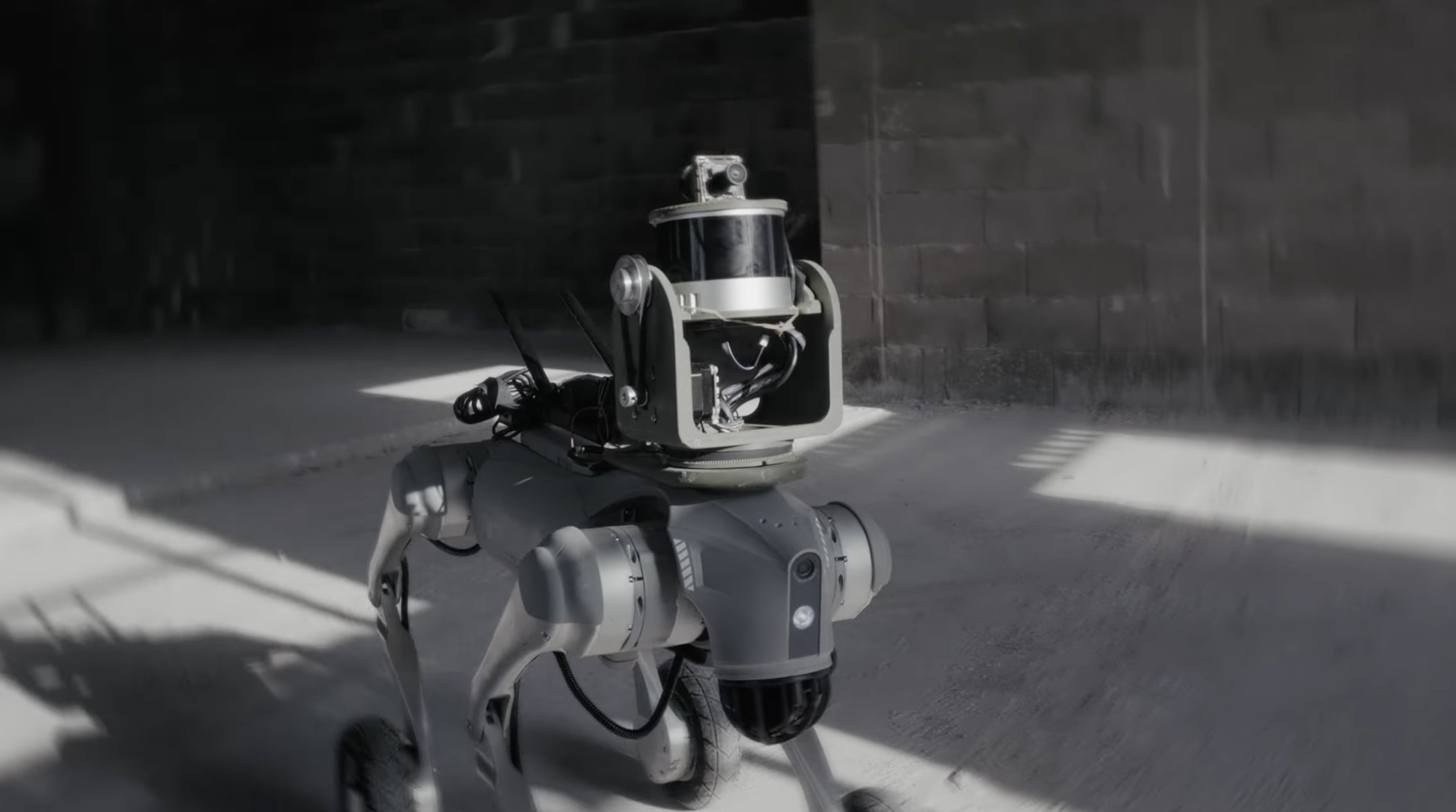
An autonomous quadruped that lives on your site.

It follows mapped routes and collects high-density LiDAR and RGB data. Each scan is processed, aligned with project coordinates, and compared with selected BIM layers. Your team receives visual reports and deviation alerts—typically within 24 hours.

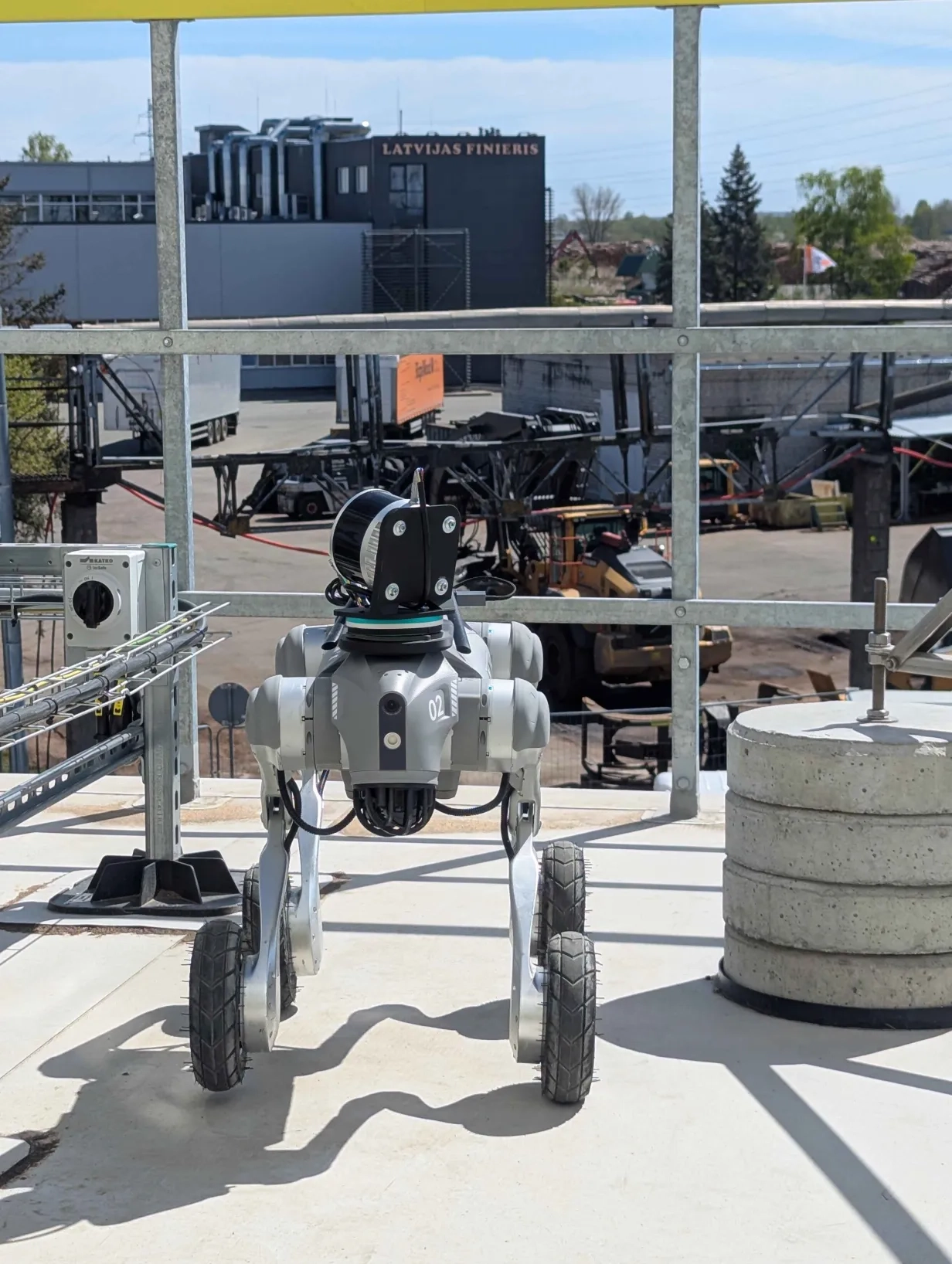
Positronic Bot quadruped platforms on site

Detect BIM Deviations Early

Identify missing, misplaced, or incorrectly installed elements before other trades build around them.

Verify Construction Progress

Compare scans over time to create a dated, objective record of installed work and project progress.

Control Quality & Subcontractor Work

Use scan evidence to review completed work, verify claims, and resolve disagreements with reliable data.

Create As-Built Deliverables

Receive cleaned, aligned point clouds for documentation, handover, coordination, and surveying workflows.
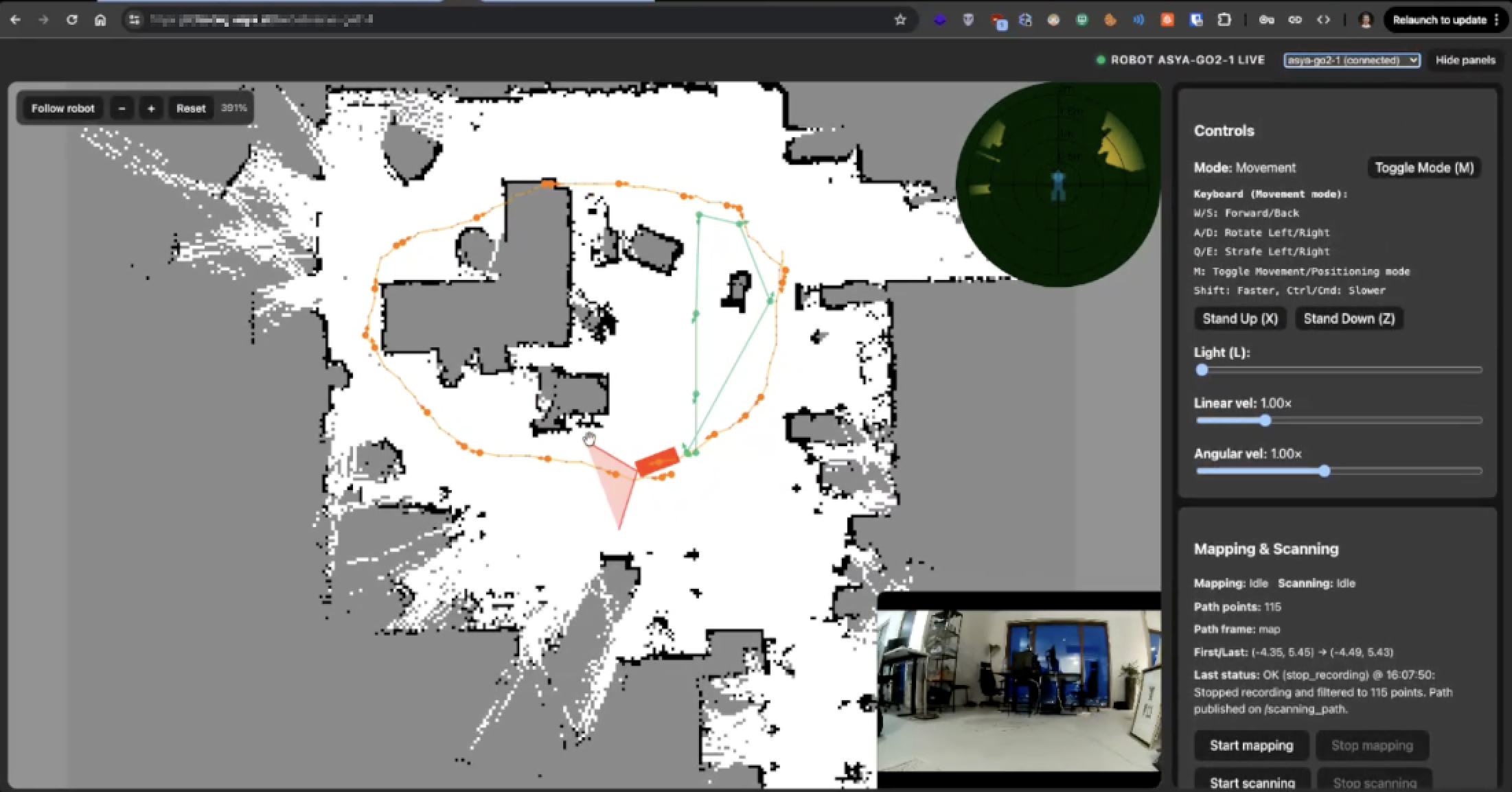
Access the Site Remotely

Teleoperate the robot and inspect selected areas without requiring every stakeholder to travel to the site.

Support Safer Site Operations

Run missions during low-activity periods and use scan data to check barriers, edge protection, and access.

WORKFLOW

From BIM model to deviation alert in six steps.

  1. 01

    Configure the Project

    Upload the BIM model, select relevant layers, deviation thresholds, scan areas, mission frequency and scan quality.

  2. 02

    Map Safe Routes Once

    Our team teleoperates the robot through approved paths — including stairs, elevators, and outdoor areas.

  3. 03

    Scan Automatically

    Missions run during the day, at night, or during low-activity periods. The robot returns to its dock to charge.

  4. 04

    Process and Align

    The platform stitches and cleans the point cloud, removes noise and reflective artefacts, and aligns with BIM coordinates.

  5. 05

    Compare and Notify

    The system compares against selected BIM layers, flags inconsistencies, and emails your team a visual report.

  6. 06

    Review and Export

    Review through web reports and 3D collaboration environments. Export E57, PLY, Trimble Connect and Catenda-compatible workflows.

DEMO

Watch an autonomous site scan and scan-to-BIM workflow.

Autonomous scanning and teleoperation interface
TELEOPERATION UI
Positronic Bot recorded demonstration
RECORDED DEMO
DETECTION

What Positronic Bot can detect.

Depending on the BIM model, selected layers, scan visibility, and configured thresholds, Positronic Bot can help identify:

  • Missing MEP installations
  • Ductwork installed in the wrong location
  • Pipework deviating from the design
  • Incorrect wall or opening positions
  • Installation clearance conflicts
  • Incomplete work in expected areas
  • Differences between planned and installed progress
  • Changes between consecutive site scans
B2 platform with Z1 robotic arm
B2 + Z1 · SCANNING PLATFORM
TESTIMONIES

UPB Group deployment.

During a live deployment with UPB Group 500m+ annual turnover, Positronic Bot detected construction deviations on the next scan cycle. In production with UBP Group across €50M+ of active construction projects

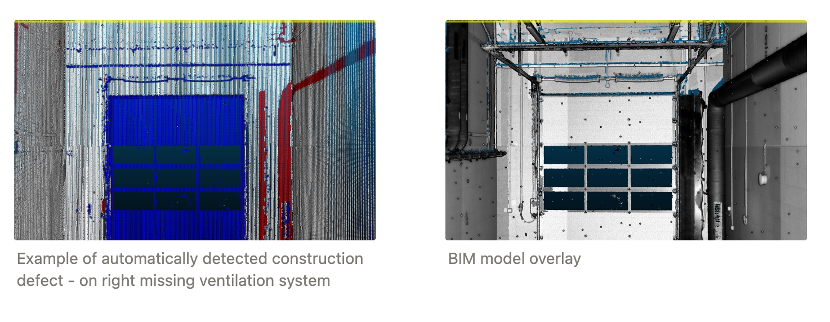
Misplaced ventilation duct detected during a live deployment
Case 01

Misplaced Ventilation Duct

A large galvanised ventilation run did not match its planned BIM location. The deviation was identified early enough for the team to respond before more work was built around it.
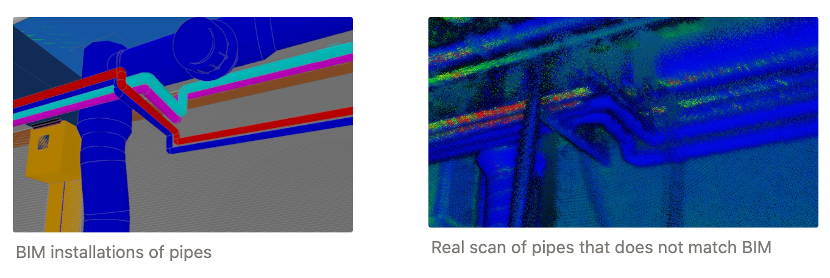
Misplaced water pipework detected before close-in
Case 02

Misplaced Water Pipework

Overhead water pipework deviated from the BIM model. The issue was detected before drywall closed the installation area, avoiding disruptive rework and schedule impact.

“The value is not simply in documenting an error. It is in finding that error while it is still relatively easy to correct.”
TIERS

Built for routine checks and detailed deliverables.

Quick Routine Scans

LOD 100 / 200
  • Faster missions
  • Fewer scan stops
  • Lower point density
  • Progress monitoring
  • Early detection of major deviations
  • Regular day or night operation

High-Quality Scans

LOD 300 / 350
  • Higher point density
  • More scan positions
  • Panoramic and RGB capture
  • Full point-cloud stitching and filtering
  • Detailed BIM comparison
  • E57 or PLY deliverables
  • Handover and as-built workflows
Example of a Positronic Bot panoramic capture
PANORAMIC CAPTURE · HIGH DENSITY
HARDWARE

Purpose-built platforms for indoor, outdoor, and demanding sites.

Indoor scanning

Unitree Go2 EDU

  • ~4 h operation
  • ~2 h charge
  • Tighter indoor spaces
  • Autonomous docking
Outdoor & rugged

Unitree B2

  • Water- and dust-resistant
  • ~6 h operation
  • ~3 h charge
  • Challenging terrain
LiDAR + RGB + edge AI

Sensor Payload

  • Ouster OS1 / Hesai XT16 LiDAR
  • High-resolution RGB imaging
  • Onboard lighting
  • NVIDIA Jetson Orin edge compute
AUTONOMY

Intelligent navigation and predictable missions.

Positronic Bot follows predefined safe routes and plans scan stops according to the selected scan quality. During a mission, the system can:

  • Navigate mapped indoor and outdoor routes
  • Operate across supported multi-floor workflows
  • Use approved stairs and elevators
  • Avoid traversable obstacles where possible
  • Notify an operator when a route is blocked
  • Return to its dock or another safe point
  • Recharge between scheduled missions

An optional robotic-arm configuration for limited manipulation, including door-opening workflows, is in development.

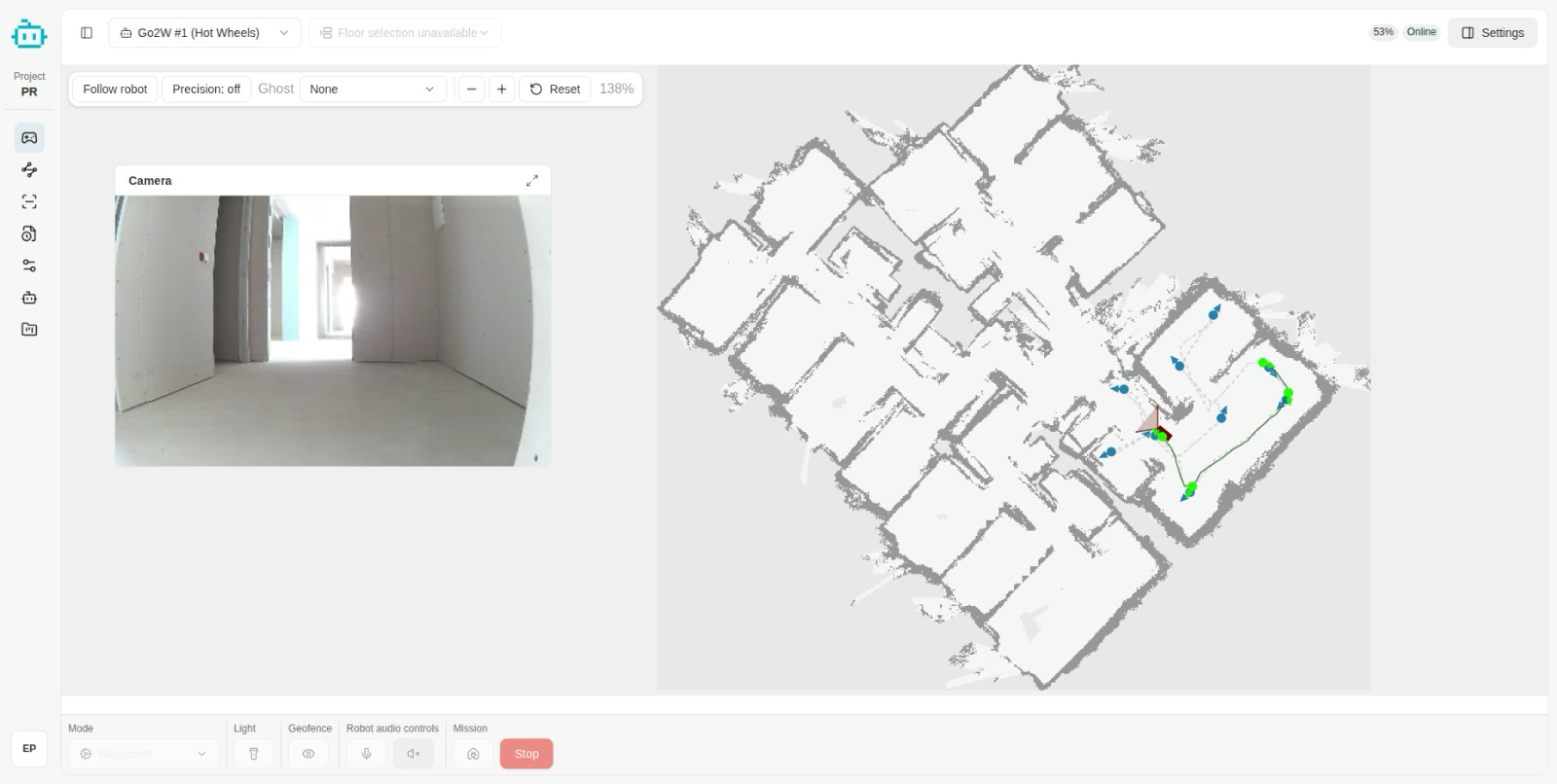
Positronic Bot mission control dashboard with camera feed and site map
LIVE MISSION DASHBOARD
STACK

Built on ROS / ROS 2 with a custom perception stack.

Robot-control behaviours are pretrained in NVIDIA Isaac Sim to support navigation on uneven terrain and future robotic-arm tasks.

  • Robot control and navigation
  • Mission planning and execution
  • LiDAR and RGB data acquisition
  • SLAM and site mapping
  • Point-cloud stitching
  • Noise filtering and clean-up
  • Semantic segmentation
  • Reflective-surface handling
  • Geodetic marker detection
  • Automatic BIM alignment
  • Progress comparison
  • Deviation detection
  • Reporting and notifications
Point-cloud semantic segmentation of obstacles, windows and reflections
OBJECT LABELS · WALLS / FLOORS / OBSTACLES / WINDOWS / REFLECTIONS
DEPLOYMENT

Deployment without adding a site staffing burden.

Deployment, teleoperation, processing, and robot maintenance are handled by the Positronic Bot team.

Week 1

Project Setup

  • BIM upload
  • Layer selection
  • Deviation thresholds
  • Scan-quality presets
  • Reporting requirements
Week 2

Physical Setup & Mapping

  • Robot delivery
  • Route mapping
  • Floor & area configuration
  • Docking-station setup
  • Connectivity validation
Week 3

Validation & Missions

  • Test scans
  • BIM alignment
  • Report validation
  • Day and night scheduling
Ongoing

Continuous Operation

  • Autonomous scanning
  • Point-cloud processing
  • Deviation alerts
  • Progress reporting
  • Teleoperation & maintenance
STAKEHOLDERS

Designed for every stakeholder on site.

Browser-based tele-control and remote site presence
REMOTE PRESENCE

Developers & Asset Owners

Objective record of construction progress and structured as-built information.

General Contractors

Find problems earlier, coordinate trades, reduce rework, support schedule control.

Project & Construction Managers

Reduce repetitive site walks and review dated evidence of installed work remotely.

BIM & VDC Teams

Compare physical construction with selected model layers in familiar point-cloud workflows.

Quality & Compliance

Maintain traceable evidence of site conditions throughout the project.

Subcontractors

Confirm installations before close-in and resolve questions with shared visual data.

WHY?

Ten reasons teams choose us.

01
Deviations reported within 24 hours
02
Autonomous, repeatable site capture
03
Indoor and outdoor robotic platforms
04
Configurable scan quality
05
Automatic scan-to-BIM alignment
06
Objective progress history
07
E57 and PLY exports
08
Trimble Connect & Catenda-compatible
09
Remote site presence & teleoperation
10
Deployment & maintenance handled for you
TEAM

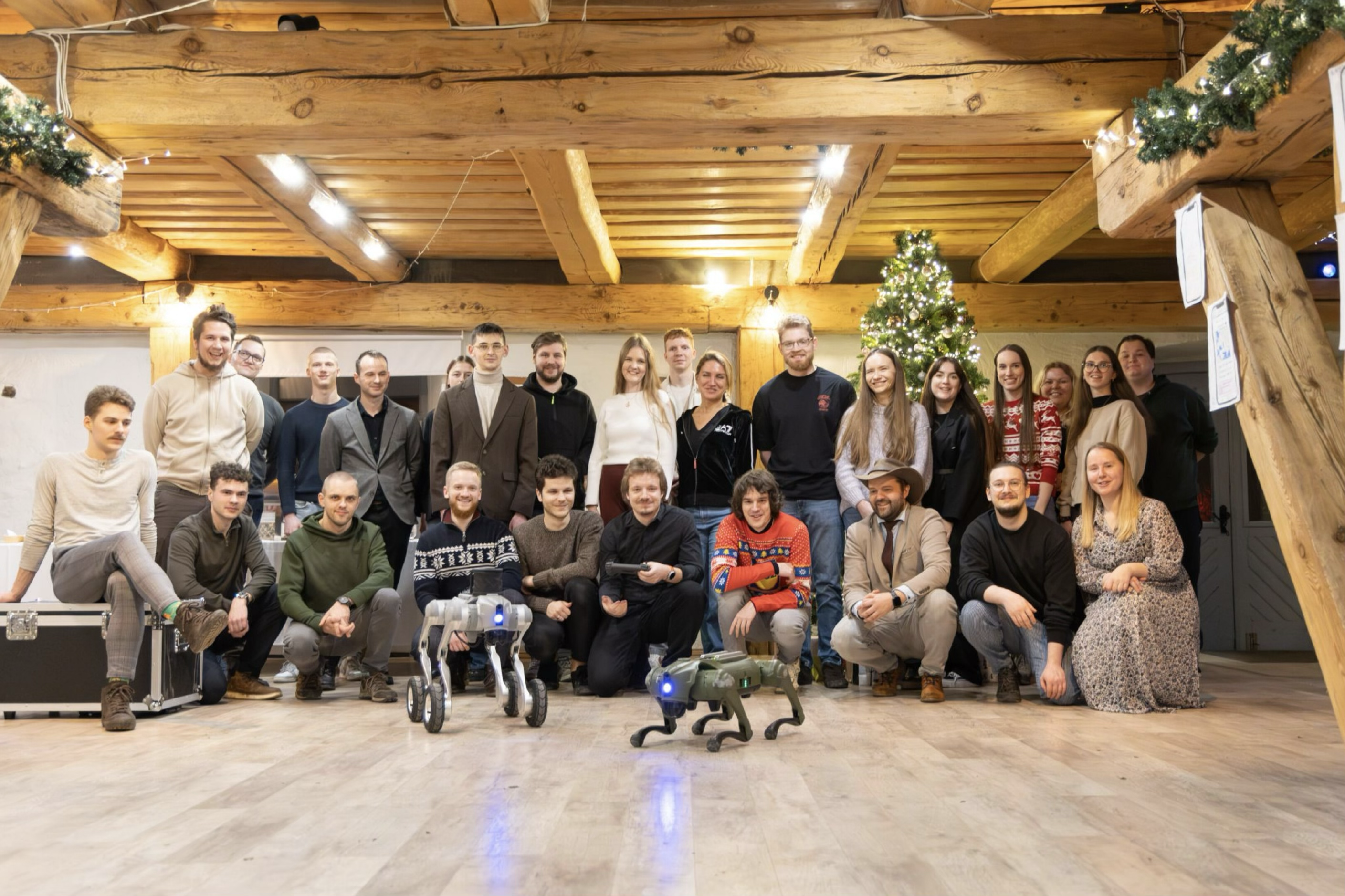
35+ specialists in robotics, AI and construction.

A multidisciplinary team spanning robotics, AI, construction technology, science, and user experience — bringing award-winning research and deployed engineering together.
35+
Specialists
20+
Peer-reviewed publications
PhD
Award-winning research
EU
R&I project participation
Partners & collaborators
UPB GroupSolisden Private EquityVolvo
The team behind Positronic Bot
THE TEAM
FAQ

Frequently asked questions.

CONTACT

Request a site survey

Please include
  • Company and project location
  • Project type and current construction stage
  • Approximate indoor and outdoor scan areas
  • BIM platform and available model formats
  • Required scan frequency
  • Preferred deliverables
  • Target pilot start date